
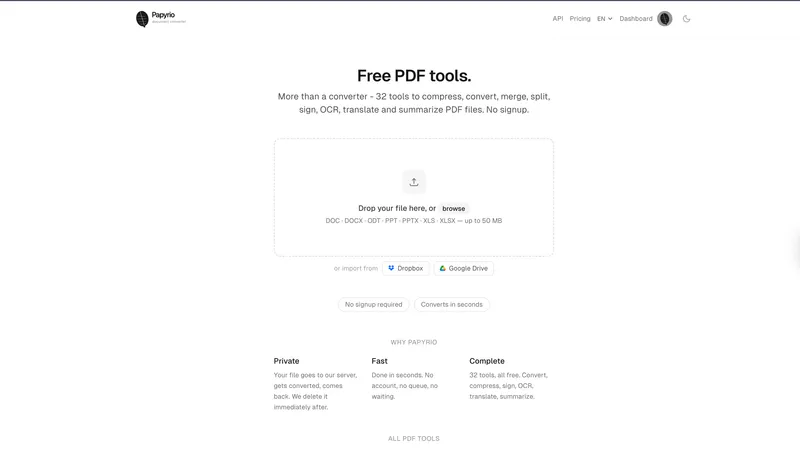
Papyrio is an online PDF toolkit with 32 tools for converting, compressing, signing, OCR, translating and summarizing PDFs, with no signup required.
What is Papyrio?
Papyrio is a web-based platform with 32 PDF tools. It accepts Word, PowerPoint, Excel, OpenDocument, image, HTML and CSV files, and can import directly from Dropbox and Google Drive. Files are processed on the server and deleted after processing; nothing is stored.
Key Features
- 32 tools: convert to and from PDF, compress, merge, split, rotate, crop, sign, redact, protect, unlock, OCR, translate and summarize
- No signup required: guests get 3 operations a day, a free account gets 10
- Fast processing: most files finish in a few seconds, with no queue
- Private by design: files are deleted after processing, no data retention
- Cloud import: open files straight from Dropbox or Google Drive
- Four languages: English, Spanish, Italian and Russian
- For developers: the same tools as a REST API on RapidAPI and as an MCP server for Claude, Cursor and VS Code
Who is it for?
- Students: convert lecture notes to PDF or compress large files to meet upload limits
- Office workers: sign documents or extract pages without installing software
- Researchers: OCR scanned articles into searchable text or summarize long PDFs
- Developers: add PDF processing to an app through the API, or to an AI assistant through the MCP server
What can you do with Papyrio?
- Convert documents to PDF: upload a DOCX or PPTX file and get a formatted PDF
- Compress PDFs: shrink image-heavy files for email or upload, with adjustable strength
- OCR scanned PDFs: turn image-only PDFs into searchable documents
- Sign PDFs: add a signature to contracts and forms without printing
How does Papyrio work?
- Drag a file onto the page, or import it from Dropbox or Google Drive.
- Choose a tool, for example Word to PDF or Compress.
- Adjust settings if the tool has any, such as compression level.
- Download the result. The file is deleted from the server afterwards.
Pricing
- Guest: free, 3 operations a day, files up to 50 MB
- Free account: 10 operations a day, files up to 50 MB
- Pro: $7 a month, no daily limit, files up to 200 MB
Pros and cons
- Pros: no signup, no watermark, files deleted after processing, cloud import, API and MCP access
- Cons: daily limits on the free tiers, 50 MB file limit without Pro, no desktop or mobile app
Alternatives
- Smallpdf: a well-known PDF suite with a larger feature set and paid plans
- iLovePDF: a popular free PDF suite with desktop and mobile apps
- Adobe Acrobat Online: Adobe's web tools, most of which require an Adobe account
FAQ
Is Papyrio free?
Yes. Every tool can be used free without an account, up to 3 operations a day, or 10 with a free account. Pro ($7 a month) removes the daily limit and raises the file size limit to 200 MB.
What file formats can I convert?
Word, PowerPoint, Excel, OpenDocument, JPG, PNG, WebP, HTML and CSV to PDF, and PDF to Word, PowerPoint, Excel, JPG, text and CSV.
How secure is my data?
Files are processed on the server and deleted after processing. No copies are kept.
Are there any file size limits?
Yes. Files up to 50 MB on the free tiers and up to 200 MB on Pro.
Does Papyrio work on mobile?
Yes. It runs in any modern browser, including on phones and tablets.
Is there an API?
Yes. A REST API is available on RapidAPI with a free tier, and an MCP server lets AI assistants use the same tools. See papyrio.net/docs and papyrio.net/mcp.


